This is Article 28 of the Qlik Sense Data Modeling Course.
Qlik Sense Course – Article 28 of 28
← Previous Article: Deployment
🎉 This is the final article of the course!
What is Data Governance? Establishing enterprise standards for naming, modeling, documentation, and code quality – for consistent, maintainable, and scalable Qlik solutions across your entire team!
What Will You Learn About Data Governance & Standards?
After this guide, you will be able to:
- Define naming conventions for tables, fields, and variables
- Establish modeling standards
- Set up a code review process
How Does the Principle of “Consistency at Scale” Work?
The Problem: 5 developers, 5 different styles – nobody understands anyone else’s code, errors pile up, maintenance becomes impossible!
The Solution: Clear standards – uniform code, easy maintenance, scalable teams!
What Are the 4 Pillars of Data Governance?
For Qlik Cloud-specific governance capabilities, see the Qlik Cloud governance overview.
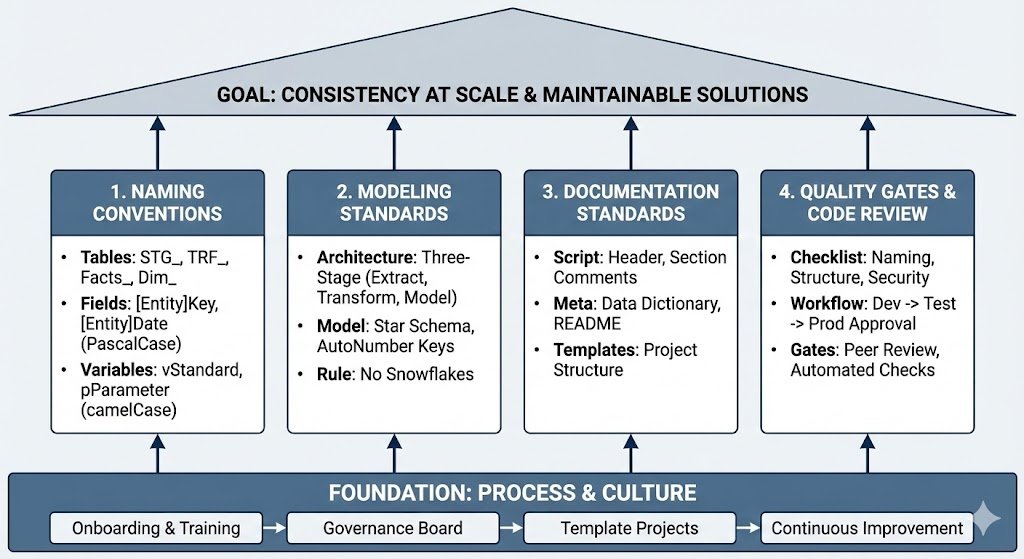
| Pillar | What? | Why? |
|---|---|---|
| Naming Standards | Consistent names for tables, fields, variables | Instantly understand what is what |
| Modeling Standards | Star Schema, key design, layer architecture | Performance, maintainability |
| Documentation | Code comments, README, Data Dictionary | Onboarding, knowledge transfer |
| Quality Gates | Code review, testing, approval process | Prevent errors, ensure quality |
What Are the Naming Conventions for Data Governance?
How Should You Handle Table Naming?
| Prefix | Usage | Examples |
|---|---|---|
STG_ |
Staging Layer (Raw Extract) | STG_Sales, STG_Customers |
TRF_ |
Transform Layer (Business Logic) | TRF_Sales, TRF_Products |
Facts_ |
Fact Tables (Model Layer) | Facts_Sales, Facts_Orders |
Dim_ |
Dimension Tables (Model Layer) | Dim_Customer, Dim_Product |
Link_ |
Link Tables (Many-to-Many) | Link_CustomerProduct |
TEMP_ |
Temporary Tables (will be dropped) | TEMP_Join, TEMP_Calculation |
How Do You Name Fields?
| Pattern | Convention | Examples |
|---|---|---|
| Keys | [Entity]Key or [Entity]ID | CustomerKey, OrderID, ProductKey |
| Dates | [Entity]Date | OrderDate, ShipDate, InvoiceDate |
| Amounts | [Metric]Amount | SalesAmount, DiscountAmount |
| Flags | Is[Condition] | IsCurrentYear, IsHighValue |
| Quality Flags | DQ_[Issue] | DQ_MissingEmail, DQ_InvalidAmount |
Important: Use PascalCase (CustomerID), NOT snake_case (customer_id) or camelCase (customerId)!
How Do You Name Variables?
| Prefix | Usage | Examples |
|---|---|---|
v |
Standard Variables | vDataPath, vCurrentYear |
p |
Parameters (in Subroutines) | pTableName, pPath |
tmp |
Temporary Variables | tmpCounter, tmpResult |
What Does the Standards Document Template Look Like?
//============================================
// NAMING CONVENTIONS
// Company: Acme Corp
// Version: 1.2
// Last Updated: 2025-01-10
//============================================

// TABLES
// Staging:    STG_[Entity]      (STG_Sales)
// Transform:  TRF_[Entity]      (TRF_Customer)
// Facts:      Facts_[Entity]    (Facts_Sales)
// Dimensions: Dim_[Entity]      (Dim_Product)
// Link:       Link_[Entity1][Entity2]
// Temp:       TEMP_[Purpose]    (TEMP_Join)

// FIELDS
// Keys:       [Entity]Key       (CustomerKey)
// IDs:        [Entity]ID        (OrderID)
// Dates:      [Entity]Date      (OrderDate)
// Amounts:    [Metric]Amount    (SalesAmount)
// Flags:      Is[Condition]     (IsCurrentYear)
// Quality:    DQ_[Issue]        (DQ_Missing)

// VARIABLES
// Standard:   v[Purpose]        (vDataPath)
// Parameters: p[Name]           (pTableName)
// Temporary:  tmp[Name]         (tmpCounter)

// CASE
// Tables:     PascalCase        (Facts_Sales)
// Fields:     PascalCase        (CustomerID)
// Variables:  camelCase         (vDataPath)
What Are the Modeling Standards for Data Governance?
What Is the Standard Architecture: Three-Stage?
//============================================
// STANDARD ARCHITECTURE
//============================================

// LAYER 1: STAGING
// Purpose: Raw extract, 1:1 from source
// Naming: STG_[Entity]
// QVD: Store to QVD/Staging/

// LAYER 2: TRANSFORM
// Purpose: Business logic, cleansing, enrichment
// Naming: TRF_[Entity]
// QVD: Store to QVD/Transform/

// LAYER 3: MODEL
// Purpose: Star schema, optimized for performance
// Naming: Facts_[Entity], Dim_[Entity]
// QVD: No QVD storage (load to memory)
What Is the Star Schema Standard?
//============================================
// STANDARD DATA MODEL: Star Schema
//============================================

// DO: Central Fact, flat Dimensions
Facts_Sales:
LOAD
    OrderKey,           // Surrogate Key
    CustomerKey,        // FK to Dim_Customer
    ProductKey,         // FK to Dim_Product
    OrderDate,          // FK to Calendar
    SalesAmount,        // Measure
    Quantity            // Measure
FROM [QVDTransformTRF_Sales.qvd] (qvd);

Dim_Customer:
LOAD
    CustomerKey,        // PK
    CustomerID,         // Business Key
    CustomerName,
    Country,
    Region,
    Segment             // All attributes in ONE table
FROM [QVDTransformTRF_Customer.qvd] (qvd);

// DON'T: Snowflake (Region in separate table)
// -> Degrades performance, complicates model
What Are the Key Design Standards?
//============================================
// KEY DESIGN STANDARD
//============================================

// DO: AutoNumber in Transform Layer
TRF_Customer:
LOAD
    AutoNumber(CustomerID, 'Customer') as CustomerKey,
    CustomerID as CustomerID_Original,  // Keep for debugging
    CustomerName,
    Country
FROM [QVDSTG_Customer.qvd] (qvd);

// DO: Same context across tables
TRF_Sales:
LOAD
    AutoNumber(OrderID, 'Order') as OrderKey,
    AutoNumber(CustomerID, 'Customer') as CustomerKey,  // Same context!
    SalesAmount
FROM [QVDSTG_Sales.qvd] (qvd);

// DON'T: Different contexts for same entity
AutoNumber(CustomerID, 'Cust')    // Wrong
AutoNumber(CustomerID, 'Customer') // Correct
What Are the Documentation Standards?
What Does the Script Header Template Look Like?
//============================================
// APPLICATION: Sales Analytics
// AUTHOR: John Doe (john.doe@company.com)
// CREATED: 2025-01-10
// LAST MODIFIED: 2025-01-15
// VERSION: 1.2.0
//============================================
// PURPOSE:
// Load and transform sales data from multiple
// sources, apply business rules, build star
// schema for analytics dashboard.
//============================================
// DATA SOURCES:
// - SQL Server: SalesDB (daily incremental)
// - Excel: Products.xlsx (weekly full)
// - REST API: Customers (hourly delta)
//============================================
// CHANGE LOG:
// 2025-01-15: Added customer segmentation (v1.2.0)
// 2025-01-12: Fixed date parsing bug (v1.1.1)
// 2025-01-10: Initial version (v1.0.0)
//============================================
What Are Section Comments?
//============================================
// SECTION 1: CONFIGURATION
//============================================

$(Must_Include=lib://Scripts/01_Config.qvs)

//============================================
// SECTION 2: STAGING LAYER
//============================================

//--------------------------------------------
// 2.1 Load Sales Data
//--------------------------------------------
STG_Sales:
LOAD
    OrderID,
    CustomerID,
    OrderDate,
    Amount
FROM [SourceSales.csv]
(txt, codepage is 1252, embedded labels);

STORE STG_Sales INTO [QVDStagingSTG_Sales.qvd] (qvd);
DROP TABLE STG_Sales;

TRACE Staging: Sales loaded - & NoOfRows('STG_Sales') & ' rows';

//--------------------------------------------
// 2.2 Load Customer Data
//--------------------------------------------
// ... etc
What Is a Data Dictionary?
//============================================
// DATA DICTIONARY
//============================================

DataDictionary:
LOAD * INLINE [
    TableName,      FieldName,      DataType,   Description,                    BusinessOwner
    Facts_Sales,    OrderKey,       Integer,    Surrogate key for order,        IT
    Facts_Sales,    SalesAmount,    Numeric,    Net sales excluding tax,        Finance
    Facts_Sales,    Quantity,       Integer,    Number of items sold,           Sales
    Dim_Customer,   CustomerKey,    Integer,    Surrogate key for customer,     IT
    Dim_Customer,   CustomerName,   String,     Full name of customer,          Sales
    Dim_Customer,   Country,        String,     Customer country code (ISO),    Sales
    Dim_Product,    ProductKey,     Integer,    Surrogate key for product,      IT
    Dim_Product,    ProductName,    String,     Full product name,              Product
    Dim_Product,    Category,       String,     Product category,               Product
];

STORE DataDictionary INTO [lib://QVD/Meta/DataDictionary.qvd] (qvd);
What Are Quality Gates & Code Review?
What Are the Code Review Checklist Items?
Naming & Structure:
- [ ] Tables follow naming convention (STG_, TRF_, Facts_, Dim_)
- [ ] Fields follow naming convention (PascalCase)
- [ ] Variables have prefix (v, p, tmp)
- [ ] Three-stage architecture is followed
Code Quality:
- [ ] Header with author, date, purpose is present
- [ ] Section comments are clearly structured
- [ ] Complex logic is commented
- [ ] No dead code remnants (commented out)
Data Quality:
- [ ] Quality checks are implemented
- [ ] Error handling is present
- [ ] Logging is enabled
- [ ] Validation before Store
Performance:
- [ ] Optimized QVD Loads are used
- [ ] AutoNumber for keys
- [ ] WHERE EXISTS() for dimensions
- [ ] No Synthetic Keys
Security:
- [ ] No credentials in code
- [ ] Section Access documented (if used)
- [ ] Sensitive data is masked
How Does the Approval Workflow Work?
1. Developer creates Feature Branch
   └─ feature/new-dimension

2. Developer implements & self-tests
   └─ Tests in DEV environment

3. Create Pull Request
   └─ In Git/Azure DevOps/Bitbucket

4. Code Review by Senior Dev
   └─ Go through checklist
   └─ Comments on improvements

5. Developer addresses review comments
   └─ Push updates to Feature Branch

6. Approval by Reviewer
   └─ Merge to dev branch

7. Deployment to TEST
   └─ QA Testing

8. Sign-Off by Business
   └─ UAT successful

9. Deployment to PROD
   └─ After approval by Tech Lead
What Are Template Projects?
What Is the Starter Template Structure?
qlik-template-project/
├── README.md
├── CHANGELOG.md
├── .gitignore
├── scripts/
│   ├── 00_Environment.qvs.template
│   ├── 01_Config_DEV.qvs
│   ├── 01_Config_TEST.qvs
│   ├── 01_Config_PROD.qvs
│   ├── 02_Functions.qvs
│   ├── 03_Subroutines.qvs
│   ├── 10_Staging.qvs
│   ├── 20_Transform.qvs
│   ├── 30_Model.qvs
│   └── 99_Validation.qvs
├── docs/
│   ├── Architecture.md
│   ├── Deployment.md
│   └── Naming_Conventions.md
└── tests/
    └── validation_tests.qvs
What Does the README Template Look Like?
# [Project Name]

## Overview
[Brief description of the application]

## Architecture
- Three-Stage Architecture (Staging/Transform/Model)
- Star Schema with [N] Facts and [M] Dimensions

## Data Sources
- [Source 1]: [Description] ([Update Frequency])
- [Source 2]: [Description] ([Update Frequency])

## Setup
1. Clone repository
2. Create `scripts/00_Environment.qvs` with: `SET vEnvironment = 'DEV';`
3. Configure data connections in QMC
4. Run initial full load

## Deployment
See [docs/Deployment.md](docs/Deployment.md)

## Contacts
- Owner: [Name] ([Email])
- Team: [Team Name]

## Version
Current: [Version Number]
What Is a Governance Board?
For a broader industry perspective on data governance frameworks, the DAMA Data Management Body of Knowledge provides an excellent reference for establishing enterprise-wide standards.
What Are the Roles & Responsibilities?
| Role | Responsibilities |
|---|---|
| Data Governance Lead | Define standards, coordinate reviews, escalations |
| Senior Developers | Code reviews, mentoring, architecture decisions |
| Developers | Follow standards, peer reviews, documentation |
| Business Analysts | Requirements, UAT, validate business rules |
What Is on the Governance Meeting Agenda?
Monthly Governance Meeting:
- Review new standards/updates (15 min)
- Discussion of open architecture questions (20 min)
- Lessons learned from last month (15 min)
- Identify training needs (10 min)
How Do I Onboard New Developers?
What Is the Onboarding Checklist?
Week 1: Basics
- [ ] Accounts & access set up
- [ ] Read naming conventions document
- [ ] Walk through template project
- [ ] Simple bugfix task (with mentor review)
Week 2-3: Standards
- [ ] Understand three-stage architecture
- [ ] Walk through code review checklist
- [ ] Create and merge a feature branch
- [ ] Implement first small feature
Week 4: Independent
- [ ] Implement a medium-sized feature independently
- [ ] Perform code review for others
- [ ] Complete a deployment process
What Are the Best Practices for Data Governance?
Establish Standards:
- [ ] Naming conventions documented
- [ ] Modeling standards defined
- [ ] Documentation requirements established
- [ ] Template projects created
Implement Processes:
- [ ] Code review mandatory
- [ ] Approval workflow established
- [ ] Governance board formed
- [ ] Regular reviews scheduled
Enable the Team:
- [ ] Onboarding process defined
- [ ] Training materials available
- [ ] Mentoring system established
- [ ] Living documentation
How Do I Troubleshoot Data Governance Issues?
Problem: Team Does Not Follow Standards
Causes:
- Standards not clearly communicated
- No consequences for non-compliance
- Standards too complex/unrealistic
Solutions:
- Training for all team members
- Strictly enforce code reviews
- Automated checks where possible
- Positive reinforcement (praise for good code)
- Regularly review and adapt standards
Problem: Code Reviews Delay Deployment
Solutions:
- Schedule dedicated review time
- Define review SLA (e.g., 24h response)
- Pair programming for critical features
- Automated checks reduce manual effort
- Train multiple reviewers
Problem: Documentation Is Not Maintained
Solutions:
- Documentation as part of Definition of Done
- Templates simplify documentation
- Code review also checks documentation
- Dedicated time for documentation sprints
- Use tools like Confluence/Wiki
What Are the Success Metrics for Data Governance?
Measure the success of your governance initiative. For community-tested approaches, see data governance discussions on Qlik Community.
| Metric | Target |
|---|---|
| Code Review Coverage | 100% of all changes |
| Standards Compliance | >95% in reviews |
| Onboarding Time | <4 weeks to productive |
| Production Incidents | Declining trend |
| Developer Satisfaction | >4/5 in survey |
What is the course conclusion?
What is Data Governance in Qlik Sense?
You have completed all 28 articles of the Qlik Sense Course!
You can now:
- Load and transform data from any source
- Build optimal data models (Star Schema)
- Develop performance-optimized apps
- Implement enterprise architecture (Three-Stage)
- Perform professional deployments
- Establish data governance
What’s Next?
1. Practice, Practice, Practice:
- Build your own projects with real data
- Apply all patterns from the course
- Experiment and optimize
2. Community:
- Qlik Community (community.qlik.com)
- Qlik Help (help.qlik.com)
- LinkedIn Groups
3. Further Development:
- Qlik Sense APIs & Extensions
- Advanced Analytics (R/Python Integration)
- NPrinting for Reporting
- GeoAnalytics
What is Data Governance in Qlik Sense?
These were all 28 articles:
- Basics (1-7): Loading data, transforming, QVD
- Modeling (8-14): Star Schema, dimensions, historization
- Advanced (15-20): Calendar, expressions, quality
- Architecture (21-26): Monitoring, three-stage, performance
- Enterprise (27-28): Deployment, governance
What to Read Next
You’ve completed all 28 articles in the data modeling course. That puts you ahead of most Qlik developers working today.
The question now is what to build with it.
Apply it to finance: The finance dashboard guide shows where data modeling decisions translate into business outcomes. This is where the technical skills start generating value.
Automate it with AI: The Qlik MCP Server guide shows how to use Claude to write and debug load scripts. The data model knowledge you just built is what makes AI-assisted development actually work.
Review the foundations: Back to the course overview if you want to revisit specific articles or share the course with your team.
Slug: qlik-data-governance
Keywords: Qlik Data Governance, Qlik naming conventions, Qlik standards, code review Qlik, Qlik best practices, modeling standards Qlik, documentation Qlik, template projects Qlik